
Breadcrumbs
Breadcrumbs are user interface elements commonly used by websites to provide a hierarchical pathway for easy navigation and orientation within a website's structure.
They typically appears as a horizontal trail of clickable links, usually located near the top of the page or within a designated navigation bar, as can be seen here:

By default, all breadcrumbs point to the index page of their given folder.
Global Updates
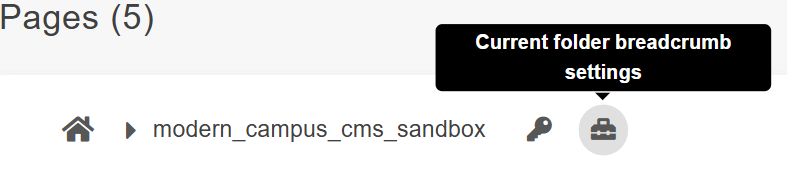
To add or update the breadcrumb of the folder you are in, click the Current Folder Breadcrumb Settings icon:
You will be taken to the Modern Campus CMS Current Folder Breadcrumb Settings menu, where you can make the necessary changes:
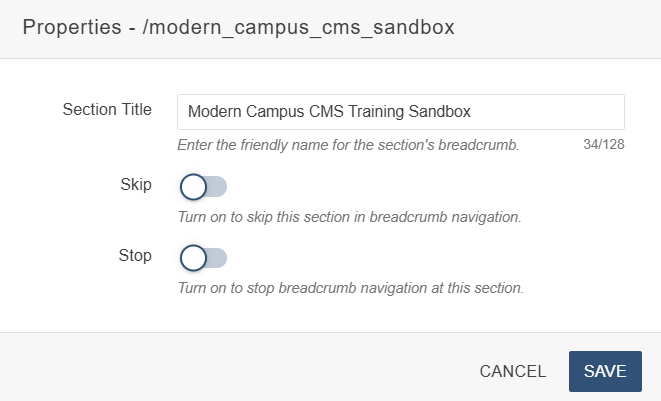
Section Title: The title of this section/folder. If you are updating this at the root of your site, this will also set the Site Title for your microsite.
The Site Title appears in the blue banner just under the hero image for your website.
Skip: If toggled on, this breadcrumb section will not appear in the trail of breadcrumbs for your folder/subfolder. This is toggled off by default.
If no index page exists, that will lead to a dead link in the breadcrumb trail. It is recommended that these sections be skipped.
Stop: If toggled on, this breadcrumb trail will stop at this section. None of the other breadcrumbs will load for your microsite after this one. This is toggled off by default.
When you are done applying changes, click on the blue 'Save' button, then publish.
NOTE: This option is only available for users with permission levels 8+. This setting
will also be overriden if changes are made to the breadcrumb from Page Parameters.
This is the only way to update the breadcrumb for index pages.
Individual Updates
As mentioned above, it is possible to update breadcrumbs for each page individually. To do so, navigate to a page's Page Parameters section after you've checked it in.
From here, fill out the Custom Breadcrumb field to change the breadcrumb for this page (pictured below)

Alternatively, if you would prefer that this page not include a breadcrumb, you have the option of disabling it for that page by unchecking the Breadcrumb box (pictured below).

Adjusting the breadcrumb here will NOT apply the same breadcrumb to pages in the same
folder. It will only apply to the page you are editing.
Changing the breadcrumb here will also overwrite any breadcrumbs that have been applied
in the Folder Breadcrumb Settings.
Index pages do not have their own unique breadcrumb, so updating this field on those
pages will not apply.